---
title: Cyber Security Awareness Month 2026
description: Turn awareness into action this Cyber Security Awareness Month with practical resources to help employees build safer habits and strengthen cyber resilience.
image: https://insight.phriendlyphishing.com/hubfs/PH2%20-%20Images%20+%20Files%20to%20Migrate/Phriendly%20Phishing%20Files%20-%20Please%20Keep/PH2-Shield-NavyBackground.png
---
[](https://phriendlyphishing.com.au)
## From Awareness to Everyday Resilience
Cyber Security Awareness Month is a chance to bring cyber security into everyday conversations and empower employees to build safer habits at work.
This year’s toolkit covers four timely topics over 4 weeks. Each week focuses on a simple behaviour employees can apply in everyday moments, from pausing before they prompt to verifying unusual requests before they act.
Use the resources below to support your Cyber Security Awareness Month activity, share practical guidance with your organisation and reinforce the everyday actions that help strengthen cyber resilience.
## Key topics
Week 1: [Safe Use of Gen AI](https://insight.phriendlyphishing.com/2026-cyber-security-awareness-month#Week1-SafeUseofGenAI) - Pause before you prompt.
Week 2: [Chat Phishing](https://insight.phriendlyphishing.com/2026-cyber-security-awareness-month#Week2-ChatPhishing) - How AI can make phishing messages harder to spot.
Week 3: [Deepfakes](https://insight.phriendlyphishing.com/2026-cyber-security-awareness-month#Week3-Deepfakes) - How AI can manipulate trust, identity and urgency.
Week 4: [Handling Sensitive Information](https://insight.phriendlyphishing.com/2026-cyber-security-awareness-month#Week4-SensitiveInformation) - Stop and check before you share.
[Download the Cyber Security Awareness Month Poster](https://insight.phriendlyphishing.com/hubfs/CAM%202026/Cyber%20Security%20Awareness%20Month%202026%20-%20Poster.pdf?hsLang=en)
##### Why Cyber Security Awareness Month matters
Read the blog to explore why awareness matters, how threats are evolving and how organisations can turn cyber security education into everyday action.
[Read the Blog](https://insight.phriendlyphishing.com/cam26-from-awareness-to-everyday-action?hsLang=en)
Use the campaign poster to promote the month and reinforce simple actions employees can take to support safer cyber behaviours.
## Week 1: Safe Use of Gen AI - Pause before you prompt
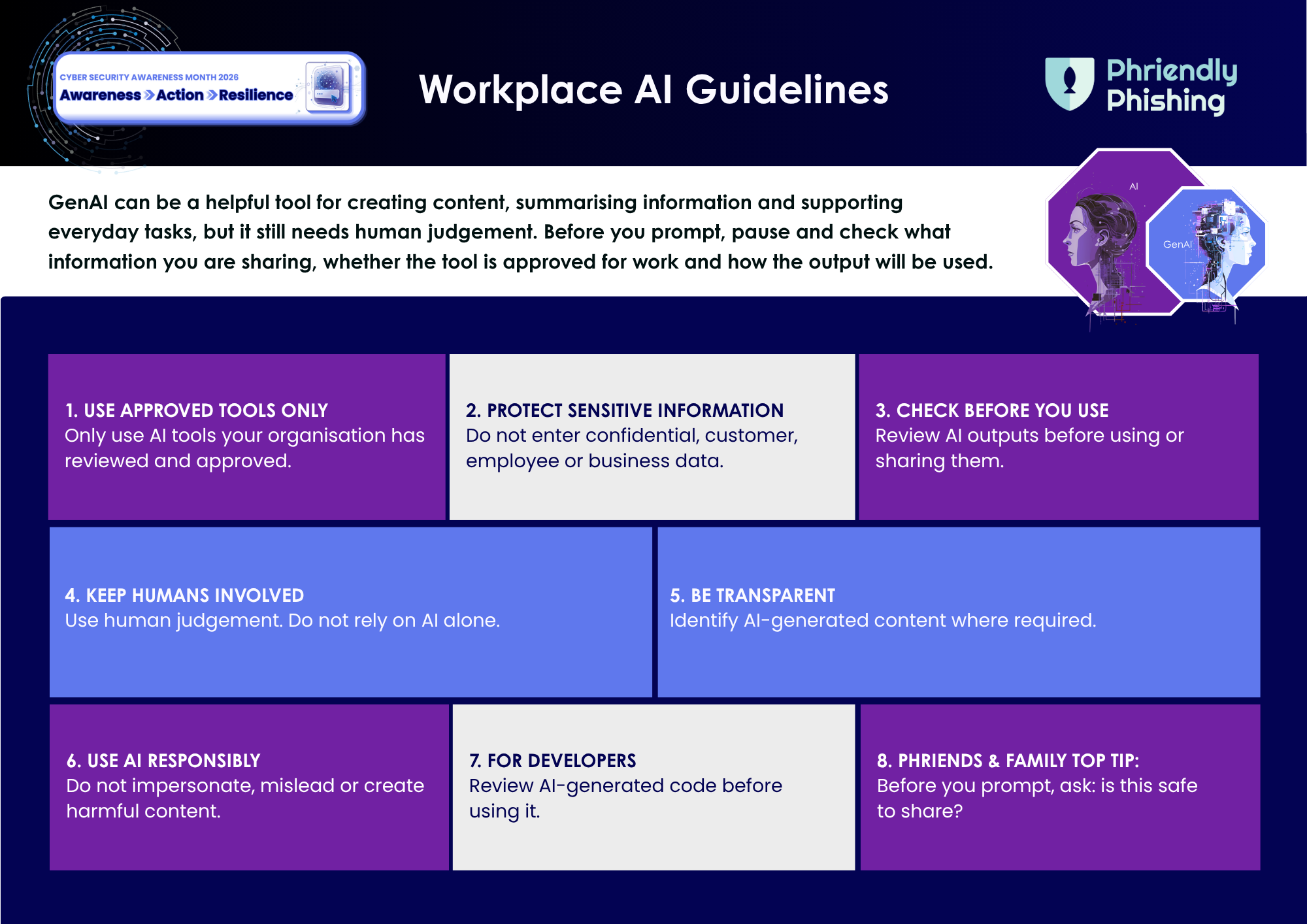
Generative Artificial Intelligence (Gen AI) can help people create content, summarise information and support everyday tasks, but safe use starts with understanding what information is being shared, which tools are approved and why outputs should be reviewed before use.
This week focuses on helping employees build safer Gen AI habits at work. The goal is to encourage a simple pause before entering information into AI tools, so employees can better protect company, customer and personal information.
Before using Gen AI, employees should pause and ask: Is this information safe to share here?
Help your team reinforce safer Gen AI habits, from checking the tool to protecting sensitive information and reviewing outputs before use.
Safe Use of Gen AI Tipsheet
A quick checklist to support safer Gen AI use at work.
[Download the Tipsheet](https://insight.phriendlyphishing.com/hubfs/CAM%202026/Safe%20Use%20of%20GenAI%20Tipsheet.pdf?hsLang=en)
### Watch the Video - Test your Safe Use of Gen AI Knowledge
Safe Use of Gen AI - Pause before you Prompt: A practical blog that explains why safe Gen AI use matters, common workplace moments to pause and how to use AI tools more responsibly.
[Read the Blog](https://insight.phriendlyphishing.com/cam26-pause-before-you-prompt?hsLang=en)
Chat Phishing: Why Workplace Chat Scams Are Getting Harder to Spot
A practical blog on how scammers can use chat tools, impersonation and AI-assisted messages to make unsafe requests feel more convincing.
[Read the Blog](https://insight.phriendlyphishing.com/cam26-chatphishing?hsLang=en)
## Week 2: Chat Phishing - How AI can make chat messages harder to trust
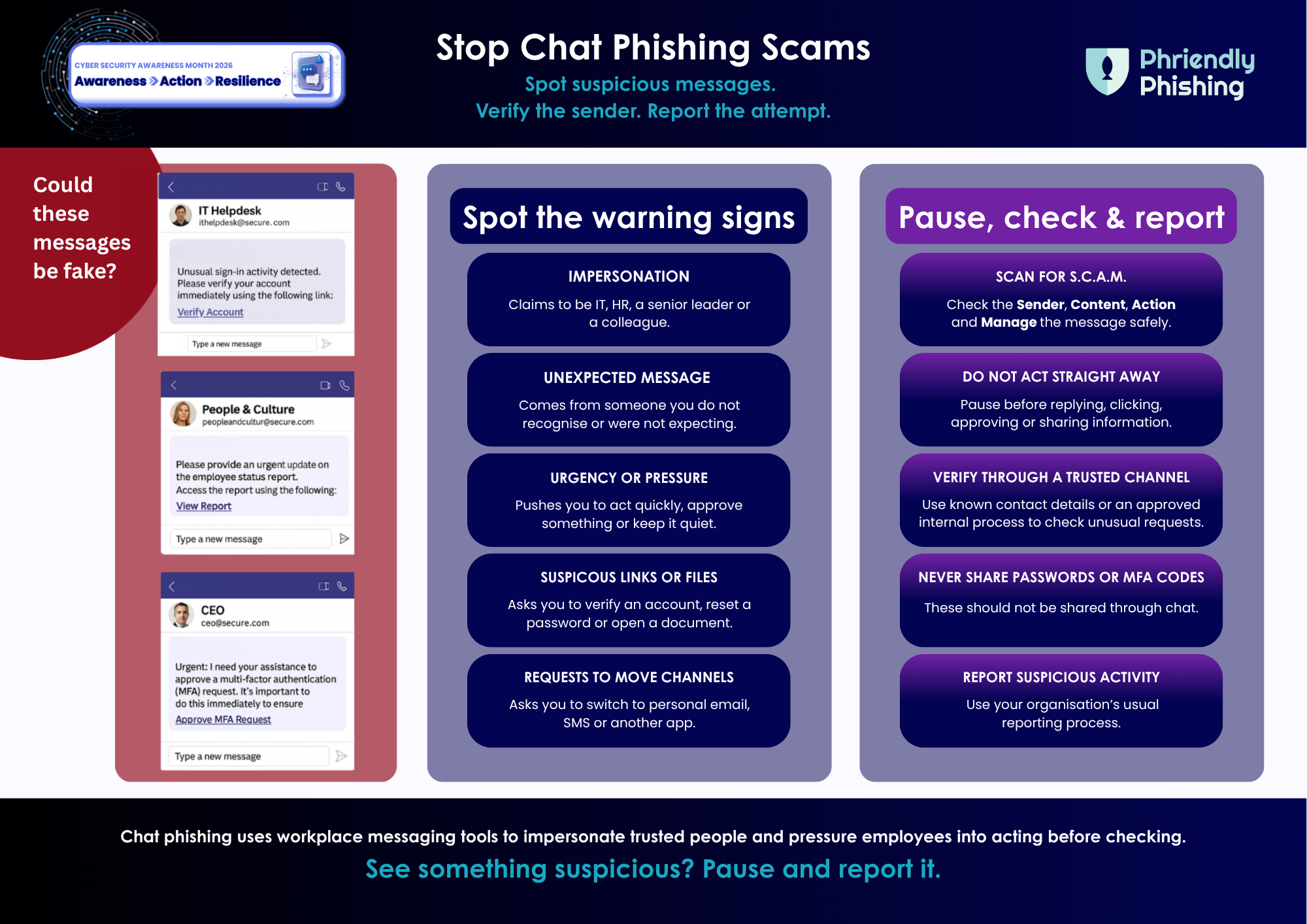
Chat Phishing uses workplace chat tools and messaging platforms to impersonate trusted people or services, such as IT support, HR, executives, colleagues, or external contacts. These messages can feel quick, familiar, and low risk, which can make employees more likely to respond before checking.
This week focuses on helping employees recognise suspicious chat messages and unexpected requests in tools like Microsoft Teams, Slack or other workplace messaging platforms. The goal is to encourage employees to pause before replying, clicking on a link, sharing information or approving a request, especially when the message feels urgent, unusual, or out of context.
Before responding to an unexpected chat message, employees should pause and ask: Do I know who is really behind this request?
Help your team spot phishy signs in workplace chat messages and report anything that feels unusual.
Chat Phishing Tipsheet
A quick checklist for recognising suspicious chat messages.
[Download the Tipsheet](https://insight.phriendlyphishing.com/hubfs/CAM%202026/Stop%20ChatPhishing%20Scams.pdf?hsLang=en)
## Week 3: Deepfakes - How AI can manipulate trust, identity and urgency
Deepfakes can make it harder to rely on what we see or hear alone. AI-generated video, audio and images can be used to impersonate trusted people, create pressure and make unusual requests feel more convincing.
This week focuses on helping employees understand how deepfakes can be used in scams and why verification matters when something feels unusual, urgent or sensitive. The goal is to encourage employees to pause before acting on requests that rely on voice, video or appearance alone.
Before acting on an unusual or urgent request, employees should pause and ask:
Have I verified this through a trusted channel?
Help your team spot possible deepfake warning signs and take safer action before they trust, share or act.
[Download the Tipsheet](https://insight.phriendlyphishing.com/hubfs/CAM%202026/How%20to%20Spot%20a%20Deepfake.pdf?hsLang=en)
[Read the Blog](https://insight.phriendlyphishing.com/cam26-how-to-spot-a-deepfake?hsLang=en)
Help your team understand how deepfakes can be used to impersonate trusted people and make unusual requests feel more convincing.
**Watch the video** to introduce the topic, then **test your knowledge** with a short quiz on when to pause, check and verify.
[Test Your Knowledge](https://form.typeform.com/to/XbNAwMph)

Handling Sensitive Information: What to Check Before You Share
A practical blog on how everyday actions can expose sensitive information, and the simple checks that help protect privacy, trust and business information.
[Read the Blog](https://insight.phriendlyphishing.com/cam26-handling-sensitive-information?hsLang=en)
## Week 4: Handling Sensitive Information - Stop and check before you share
Sensitive information is part of everyday work. It can appear in emails, documents, spreadsheets, reports, screenshots, chat messages and Gen AI prompts. When information is shared too quickly, sent to the wrong person or uploaded to the wrong place, the impact can go beyond a simple mistake. It can affect privacy, customer trust, business operations and, in some cases, lead to financial or compliance consequences.
This week focuses on helping employees recognise sensitive information and handle it with care. The goal is to encourage a simple pause before sharing, forwarding, uploading or entering information into a tool, so employees can better protect the people and organisation behind the data.
**Before responding to an unexpected chat message, employees should pause and ask: Do I know who is really behind this request?**
Help your team stop and check before sensitive information is sent, uploaded, forwarded or shared.
**Handling Sensitive Information Tipsheet**
A quick checklist to support safer decisions when handling sensitive information at work.
[Download the Tipsheet](https://insight.phriendlyphishing.com/hubfs/CAM%202026/Keep%20it%20Safe-Your%20Guide%20to%20Handling%20Sensitive%20Information.pdf?hsLang=en)
### Download the Weekly Tipsheets
Keep the key behaviours front of mind with four quick-reference tipsheets. Share them with your team throughout the month to support safer everyday actions across Gen AI, Chat Phishing, deepfakes and sensitive information.
[](https://insight.phriendlyphishing.com/hubfs/CAM%202026/Safe%20Use%20of%20GenAI%20Tipsheet.pdf?hsLang=en)
#### [Safe Use of Gen AI Pause before you prompt.](https://insight.phriendlyphishing.com/hubfs/CAM%202026/Safe%20Use%20of%20Gen%20AI%20Tipsheet.pdf?hsLang=en)
[](https://insight.phriendlyphishing.com/hubfs/CAM%202026/Stop%20ChatPhishing%20Scams.pdf?hsLang=en)
### [Chat Phishing Check before you respond.](https://insight.phriendlyphishing.com/hubfs/CAM%202026/Stop%20ChatPhishing%20Scams.pdf?hsLang=en)
[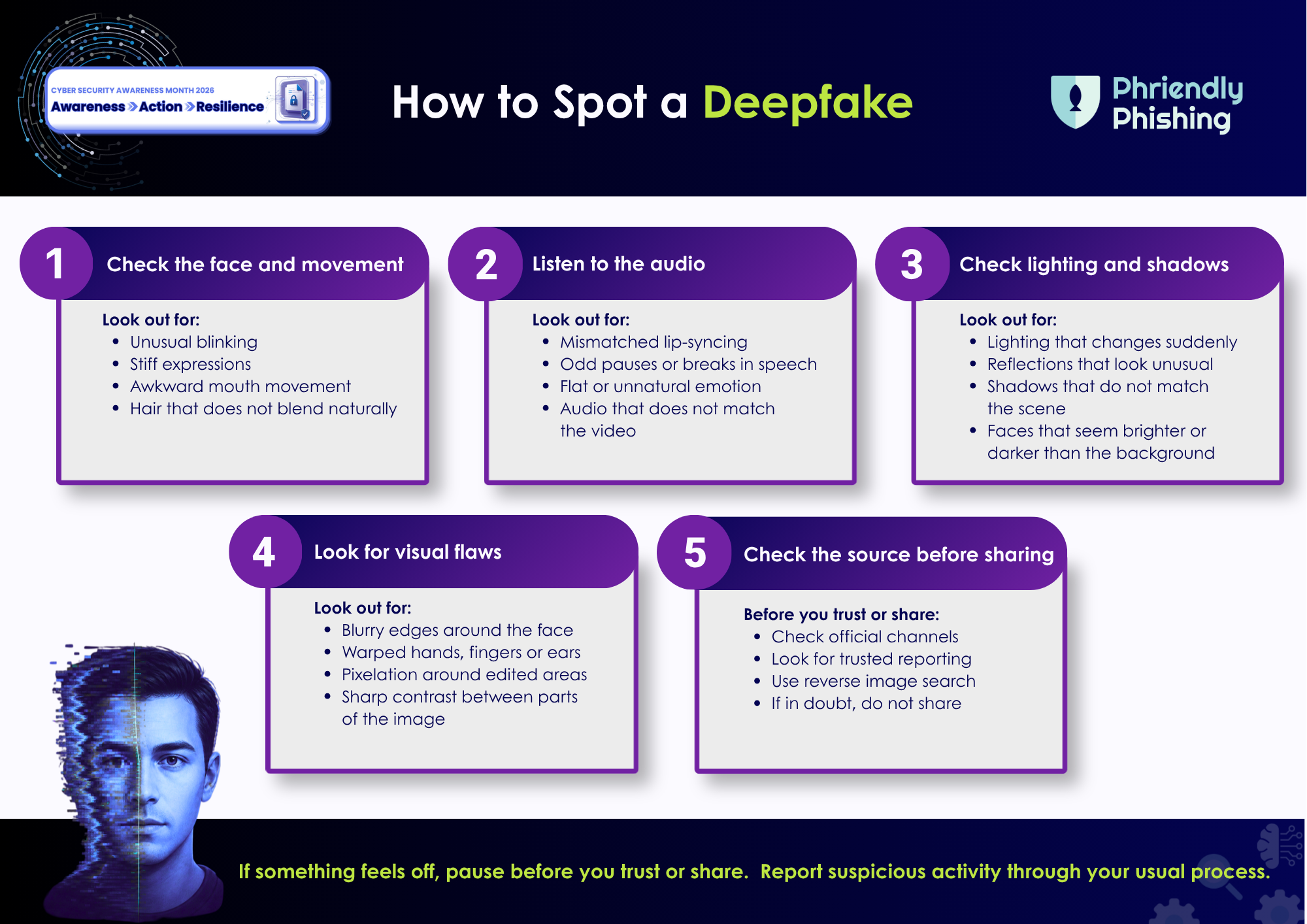](https://insight.phriendlyphishing.com/hubfs/CAM%202026/How%20to%20Spot%20a%20Deepfake.pdf?hsLang=en)
### [Deepfakes Pause before you trust.](https://insight.phriendlyphishing.com/hubfs/CAM%202026/How%20to%20Spot%20a%20Deepfake.pdf?hsLang=en)
[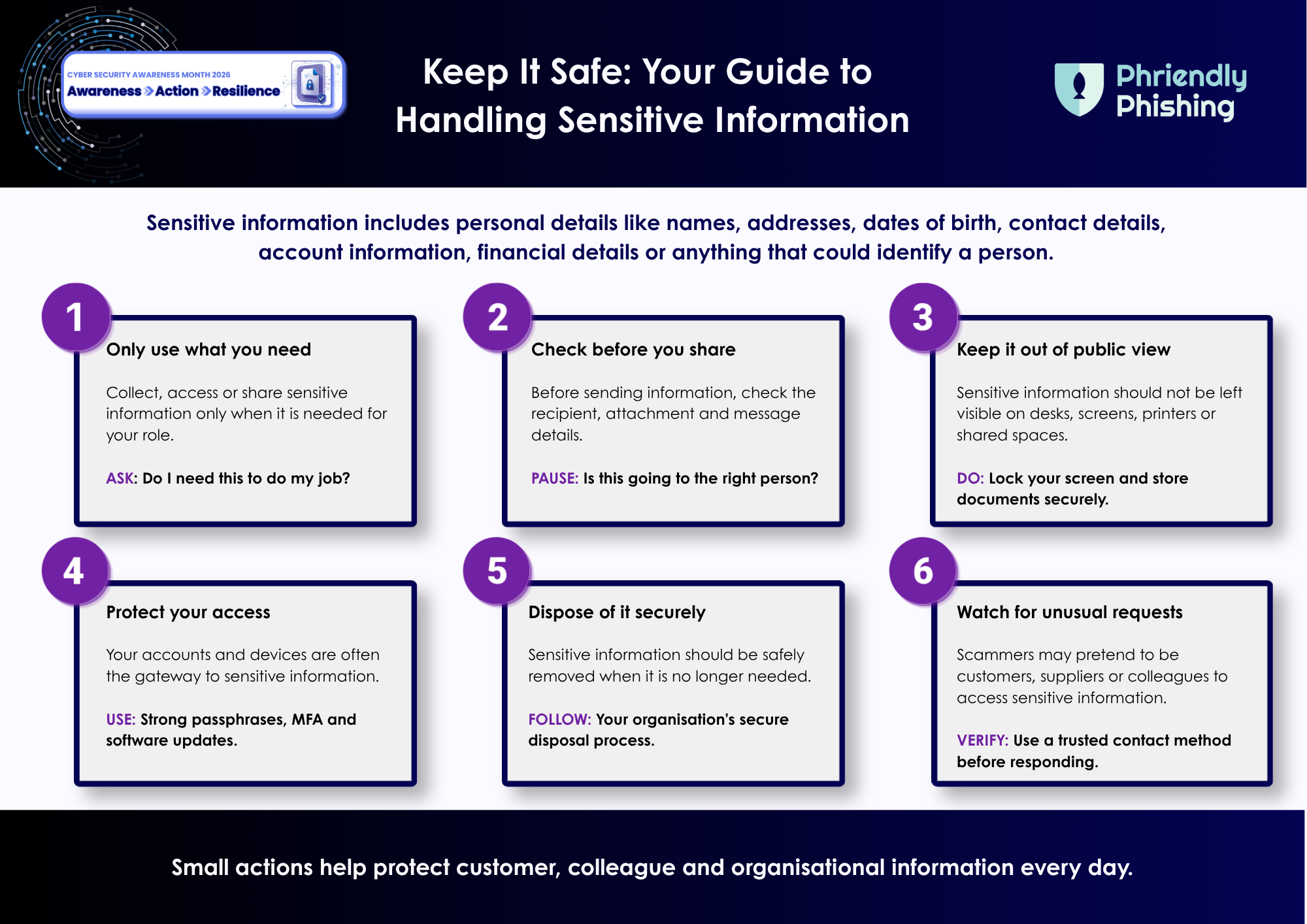](https://insight.phriendlyphishing.com/hubfs/CAM%202026/Keep%20it%20Safe-Your%20Guide%20to%20Handling%20Sensitive%20Information.pdf?hsLang=en)
### [Handling Sensitive Information Stop and check before you share.](https://insight.phriendlyphishing.com/hubfs/CAM%202026/Keep%20It%20Safe%20Your%20Guide%20to%20Handling%20Sensitive%20Information.png?hsLang=en)
Tell us what you thought of the material by [completing a quick survey](https://form.typeform.com/to/iqOraqAf).
---
Here at Phriendly Phishing, we pride ourselves on staying ahead of the curve by always adding new, relevant, and localised content for our learners.
Discover how Phriendly Phishing can help protect your business and employees from the ever-growing threat of phishing attacks and data breaches.
[Request a Demo](https://phriendlyphishing.com/request-a-demo/)
[](https://phriendlyphishing.com.au)
Phriendly Phishing Copyright © 2026 | [Terms and Conditions](https://phriendlyphishing.com/terms-and-conditions/) | [Privacy Policy](https://www.phriendlyphishing.com/privacy-policy)
```json
{
"@context" : "https://schema.org",
"@type" : "VideoObject",
"contentUrl" : "https://24300703.fs1.hubspotusercontent-na1.net/hubfs/24300703/video_assets/218237360909/inherited/web_optimized.mp4",
"dateModified" : "2026-07-29T05:15:41.856Z",
"duration" : "PT31S",
"height" : 1080,
"name" : "Cyber Security Awareness Month Video",
"thumbnailUrl" : "https://24300703.fs1.hubspotusercontent-na1.net/hubfs/24300703/Cyber%20Security%20Awareness%20Month%20Video.mp4/medium.jpg",
"uploadDate" : "2026-07-29T05:15:37.210Z",
"width" : 1920
}
```
```json
{
"@context" : "https://schema.org",
"@type" : "VideoObject",
"contentUrl" : "https://24300703.fs1.hubspotusercontent-na1.net/hubfs/24300703/video_assets/217501519505/inherited/web_optimized.mp4",
"dateModified" : "2026-07-20T01:59:00.149Z",
"duration" : "PT1M13S",
"height" : 1080,
"name" : "Draft - Safe Use of GenAi Quiz - Cyber Security Awareness Month 2026",
"thumbnailUrl" : "https://24300703.fs1.hubspotusercontent-na1.net/hubfs/24300703/Draft%20-%20Safe%20Use%20of%20GenAi%20Quiz%20-%20Cyber%20Security%20Awareness%20Month%202026.mp4/medium.jpg",
"uploadDate" : "2026-07-20T01:58:55.299Z",
"width" : 1920
}
```
```json
{
"@context" : "https://schema.org",
"@type" : "VideoObject",
"caption" : {
"@type" : "MediaObject",
"contentUrl" : "https://insight.phriendlyphishing.com/media-transcripts/217507076415/en.vtt",
"inLanguage" : "en",
"name" : "en Captions"
},
"contentUrl" : "https://24300703.fs1.hubspotusercontent-na1.net/hubfs/24300703/video_assets/217507076415/inherited/web_optimized.mp4",
"dateModified" : "2026-07-20T04:20:00.166Z",
"duration" : "PT1M6S",
"height" : 1080,
"name" : "DRAFT- Deepfakes and Psychological Manipulation Video",
"thumbnailUrl" : "https://24300703.fs1.hubspotusercontent-na1.net/hubfs/24300703/DRAFT-%20Deepfakes%20and%20Psychological%20Manipulation%20Video.mp4/medium.jpg",
"uploadDate" : "2026-07-20T04:19:53.309Z",
"width" : 1920
}
```